




What Is the Bambu Lab P2S Combo?
The Bambu Lab P2S Combo is a fully enclosed CoreXY desktop 3D printer bundled with the AMS 2 Pro, Bambu Lab’s second-generation Automatic Material System. Launched in October 2025, the P2S is the direct successor to the P1S, which had become one of the best-selling enclosed printers in the mid-range segment.
The P2S Combo sits in the middle of Bambu Lab’s current line-up: above the open-frame A-series for those who need enclosure and higher-temperature material capability, and below the industrial H2 series for users who require a heated chamber and advanced engineering materials. It is priced at £699 inc. VAT (£582.50 ex. VAT) from Additive-X, and comes ready to print straight from the box.
This Bambu Lab P2S Combo review covers everything you need to know before buying: the full specifications, what has genuinely changed compared to the P1S, how the AMS 2 Pro performs, and whether the Combo configuration is worth the premium over the standalone printer.
Bambu Lab P2S Combo Specs
Here are the core Bambu Lab P2S Combo specs. These are the figures that matter most when comparing this printer against the competition.
Specification | Bambu Lab P2S Combo |
Technology | FFF (Fused Filament Fabrication), CoreXY |
Build Volume | 256 × 256 × 256 mm |
Max Print Speed | 600 mm/s |
Max Acceleration | 20,000 mm/s² |
Extruder | DynaSense PMSM servo (70% more force than P1S) |
Nozzle System | Quick-swap (tool-free), 0.2 / 0.4 / 0.6 / 0.8 mm |
Nozzle Compatibility | H2 series nozzles (not A1 nozzles) |
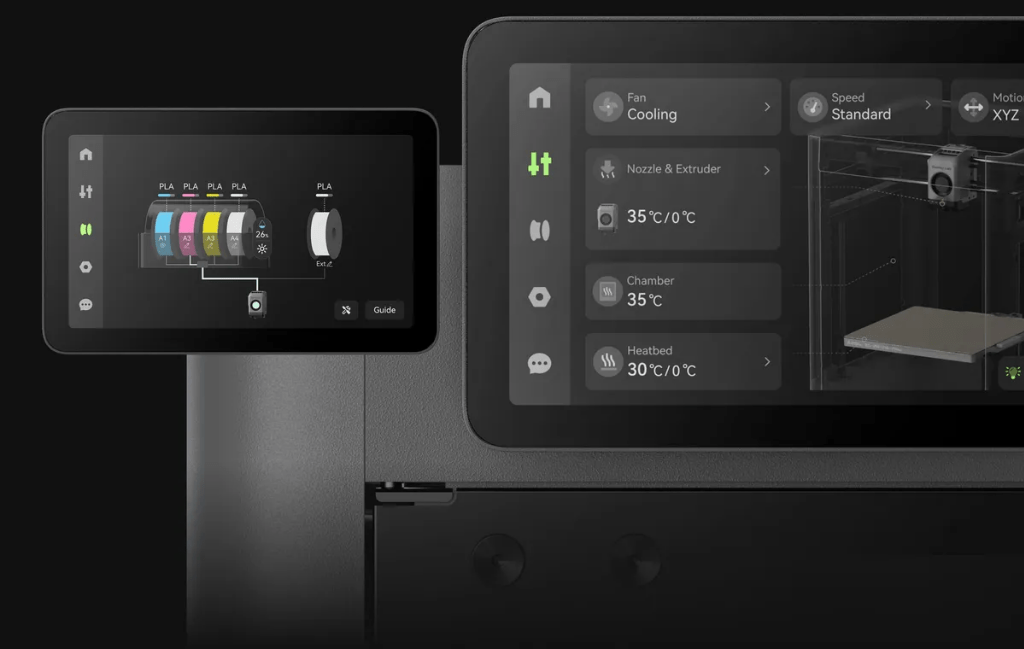
Screen | 5-inch full-colour touchscreen, 2nd-gen UI |
Camera | Built-in, AI failure detection (spaghetti detection) |
Bed Levelling | Automatic (runs before each print by default) |
Flow Calibration | Automatic (eddy current pressure sensor, real-time) |
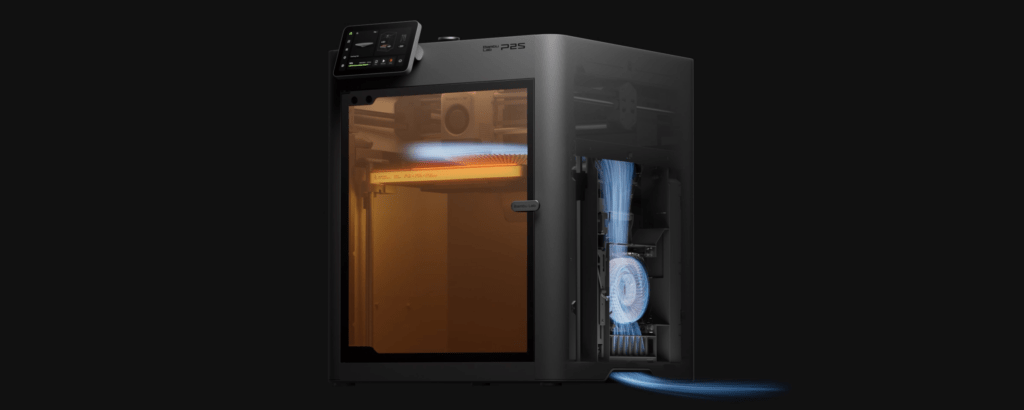
Cooling System | Cold-air intake with adaptive flap control |
Chamber | Fully enclosed (passive heating, not actively heated) |
Connectivity | Dual-band Wi-Fi, LAN-only mode supported |
Multi-material (Combo) | AMS 2 Pro — 4 active filament slots |
Max AMS Expansion | Up to 24 filaments (4× AMS 2 Pro + 8× AMS HT) |
Filament Drying (Combo) | Yes, active venting (not simultaneous with printing) |
Slicer | Bambu Studio (free), Bambu Handy mobile app |
Price (ex. VAT) | £582.50 (Combo) from Additive-X |
One note on the Bambu Lab P2S Combo specs that often causes confusion: the chamber is enclosed and does warm up during printing, but there is no active chamber heating element. For most engineering materials, this is sufficient. If you need to print PPS-CF, PAHT-CF, or similar high-performance filaments that require a consistently heated chamber above 50°C, the Bambu Lab H2 series is a better fit.
Design and Build Quality
From the outside, the P2S looks like a clear evolution of the P1S rather than a completely different machine. The overall footprint is similar, the enclosure retains its clean, functional aesthetic, and the side-mounted spool rack makes loading single materials much more convenient than the old rear-mounted arrangement on earlier P-series printers.
The biggest visible change is the new 5-inch full-colour touchscreen on the front panel. This replaces the small monochrome display and basic button interface on the P1S, and the difference in day-to-day usability is significant. Navigation is clear, the on-screen guidance is genuinely useful, and Bambu’s second-generation UI is well-organised for quick access to the settings you actually use.
The frame and motion system have been redesigned to be more rigid, which contributes to the improved acceleration figures and reduced print artefacts at higher speeds. The overall build feels solid. For a printer in this price range, the construction quality is above what you would expect.
Key Features: What's Actually New?
When reading a Bambu Lab P2S Combo review, it’s worth separating genuine upgrades from incremental refinements. The P2S makes several meaningful changes.
DynaSense Servo Extruder
The biggest hardware change is inside the toolhead. The P2S uses a PMSM (Permanent Magnet Synchronous Motor) servo extruder, called DynaSense, which delivers roughly 70% more extrusion force than the stepper-based system in the P1S. In practical terms, this means better grip on filament, more consistent feeding at higher speeds, and significantly reduced under-extrusion and grinding, even with demanding materials.
The extruder also includes real-time monitoring: it detects filament slips or partial clogs immediately rather than waiting for a visible failure.
Cold-Air Cooling with Adaptive Flap Control
Rather than recirculating warm chamber air for cooling, the P2S draws fresh cool air directly from outside. This improves cooling performance for overhangs and bridges, which matters when printing low-temperature materials like PLA with the door closed. For high-temperature materials, an adaptive flap automatically switches to internal air circulation to maintain chamber warmth. It is a smart system that handles a genuine trade-off well.
Tool-Free Quick-Swap Nozzle
Replacing the hotend on the P2S requires no tools at all. The clip-style system is faster than a standard nozzle swap on most other printers, and the available sizes (0.2, 0.4, 0.6, and 0.8 mm) cover the full range of common use cases. Keep a few spare hotends to hand and switching between projects with different requirements takes under a minute.
Automatic Flow Calibration
An eddy current pressure sensor monitors and compensates for flow rate in real time. The result is smooth, precise extrusion through changes in speed and direction without any manual tuning. This is not a new concept in Bambu Lab printers, but the implementation in the P2S is the most refined version to date.
Tom’s Hardware awarded the P2S its Editor’s Choice, making it the first Bambu Lab P-series printer to receive the award. That is a meaningful benchmark for a mid-range machine.
The AMS 2 Pro: Multi-Material Printing
The AMS 2 Pro (Automatic Material System 2 Pro) is the main reason to choose the Combo over the standalone P2S. It holds four filament spools and automates material changes during printing, enabling multi-colour and multi-material prints without manual intervention.
Compared to the original AMS, the AMS 2 Pro makes three concrete improvements that affect print quality and reliability:
First, filament changes are up to 60% faster thanks to a high-performance servo motor. This reduces the time spent on purge operations and colour transitions, which matters on longer multi-colour jobs.
Second, the AMS 2 Pro includes integrated filament drying. Active venting with an electromagnetic air valve keeps humidity low while filament is loaded. Up to four spools are dried simultaneously, and the spools rotate periodically to make sure drying is even. This is not a full substitute for a standalone dryer running during printing (the drying function pauses when printing), but it makes a measurable difference to moisture-sensitive materials between sessions. Stringing and bubbling caused by wet filament are noticeably reduced.
Third, tube access is exposed and easier to reach. Retrieving scraps of snapped filament from inside the unit is a task that P1S and early AMS owners will recognise as tedious. The redesign makes it considerably less painful.
RFID recognition automatically reads Bambu Lab-branded filaments and loads the correct temperature and drying parameters into Bambu Studio without any manual input. You can still use third-party filaments with manual profile settings.
Expanding further: The AMS 2 Pro supports serial expansion. Up to four AMS 2 Pro units and eight AMS HT units can be chained together, giving you access to as many as 24 different filaments in a single print job.
One practical limitation to keep in mind: TPU and other flexible filaments cannot run through the AMS. For those, you will use the side-mounted single spool holder that ships with the printer.
Print Quality and Speed
The P2S has a rated maximum speed of 600 mm/s, though Bambu Studio defaults to a significantly lower setting in everyday profiles. For most users, the default profiles produce better results than pushing to the maximum, and Bambu’s auto-calibration means the printer adjusts its own behaviour based on the model geometry.
At standard profile speeds, surface finish and dimensional accuracy are excellent. Layer lines are consistent, bridging is clean, and overhang performance is above average for an enclosed printer without a dedicated part cooling fan on the exterior of the machine. The cold-air intake system does real work here.
Tall prints benefit from the CoreXY motion system. Because the build plate only moves in the Z-axis (downward, layer by layer), rather than slamming back and forth like a bed-slinger design, taller objects adhere more reliably and are less prone to print failures on long jobs.
The built-in camera with AI failure detection (spaghetti detection) is a useful background feature for unattended printing. It will flag a complete print failure and pause the job, which is particularly useful on overnight prints or long multi-colour runs.
Material Compatibility
The P2S handles the full range of standard and intermediate engineering materials without the need for a heated chamber. The enclosed design means the chamber warms passively during printing, which is sufficient for:
PLA, PETG, TPU, ABS, and ASA all print well with the default profiles and no additional tuning. For ABS and ASA specifically, the enclosure is important for preventing warping, and users report consistent results at default settings.
For composite materials like PA-CF (nylon carbon fibre) and PA-GF (nylon glass fibre), the P2S can handle these with a hardened steel nozzle. Hardened steel hotends for the P2S are available from Additive-X. The standard brass nozzle will wear quickly with abrasive composites.
High-performance engineering filaments that require a consistently heated chamber above 50°C, such as PPS or PEEK, are not well suited to the P2S. Those materials belong in the Bambu Lab H2 series. This is not a shortcoming of the P2S specifically — it is a deliberate difference between the two product lines.
Setup and Software
Out of the box, the P2S runs a thorough self-test to confirm all systems are working before you start. Automatic bed levelling runs before each print by default, though you can disable it if you prefer not to wait. There is no Z offset to set manually. The printer determines and adjusts Z height on its own.
First-time setup, including calibration, typically takes around 45 minutes. After that, you load a model into Bambu Studio, select your profile and material, and print. For straightforward projects, there is very little else to configure.
Bambu Studio is free, available on Windows, macOS, and Linux, and works well for both simple and complex multi-colour prints. The Bambu Handy app allows you to start, monitor, and manage prints from your phone. Dual-band Wi-Fi is standard, and the P2S also supports full LAN-only operation for users who prefer not to route print jobs through the cloud.
New firmware updates are released regularly and applied via Wi-Fi. The January 2026 firmware update addressed early community reports of AMS 2 Pro communication errors during long multi-colour prints and touchscreen freezes on older firmware. Updating immediately after unboxing is recommended.
Pros and Cons
Pros
- Strong print quality at default settings, with no manual tuning required
- DynaSense servo extruder is a genuine upgrade in feeding consistency
- 5-inch touchscreen and second-gen UI are a clear improvement on the P1S
- Cold-air cooling improves overhangs and bridges with door closed
- AMS 2 Pro filament drying reduces moisture-related failures
- Tool-free quick-swap nozzle system is fast and practical
- Comprehensive auto-calibration on start-up and before each print
- LAN-only mode available for network-isolated use
- Tom’s Hardware Editor’s Choice — first P-series printer to receive it
Cons
- Chamber is not actively heated — not suitable for PPS-CF, PEEK, or similar
- AMS cannot handle TPU or most flexible filaments
- Filament drying and printing cannot run simultaneously without a separate power adapter
- Purge waste (poop bucket) is still required for multi-colour prints
- AMS 2 Pro can struggle with cardboard-core spools — use refillable spool brands
- Slightly noisier than the A1 series in operation
Who Is the Bambu Lab P2S Combo For?
This printer is a good fit for:
→ Engineers and product designers prototyping in ABS, ASA, PETG, or PA-CF who need reliable results without extensive machine management.
→ Small businesses and Etsy sellers running moderate print volumes who want consistent output and multi-colour capability.
→ Advanced hobbyists who have outgrown open-frame machines and want to print a wider range of materials.
→ Education departments needing a printer that is quick to set up, easy to supervise, and capable across a range of materials.
→ Anyone upgrading from a P1S who wants a meaningfully better extruder, screen, and multi-material workflow without switching to the H-series price point.
If you are printing PLA only and don’t need an enclosure, the Bambu Lab A1 series is a more cost-effective starting point. If you need a heated chamber for serious engineering-grade filaments, the Bambu Lab H2 series is designed for that application. The P2S Combo sits squarely between those two use cases.
Final Verdict
The Bambu Lab P2S Combo is a well-executed second generation of a printer that was already popular. Bambu Lab focused its improvements on the areas that P1S users had consistently flagged: the extruder, the screen, the cooling, and the multi-material reliability. The result is a machine that prints with greater consistency, handles a wider range of materials with less fuss, and is more pleasant to use day-to-day.
At £699 inc. VAT for the Combo, it sits at a price that is competitive for what it delivers. The AMS 2 Pro is the right inclusion for the Combo configuration. If multi-colour or multi-material printing is any part of your plans, it is worth having from the start rather than adding later.
For new buyers who need an enclosed mid-range printer and who want a machine that works well out of the box without extensive configuration, the Bambu Lab P2S Combo is a sound choice. It does what it says it will, reliably and consistently, which is ultimately what matters.