




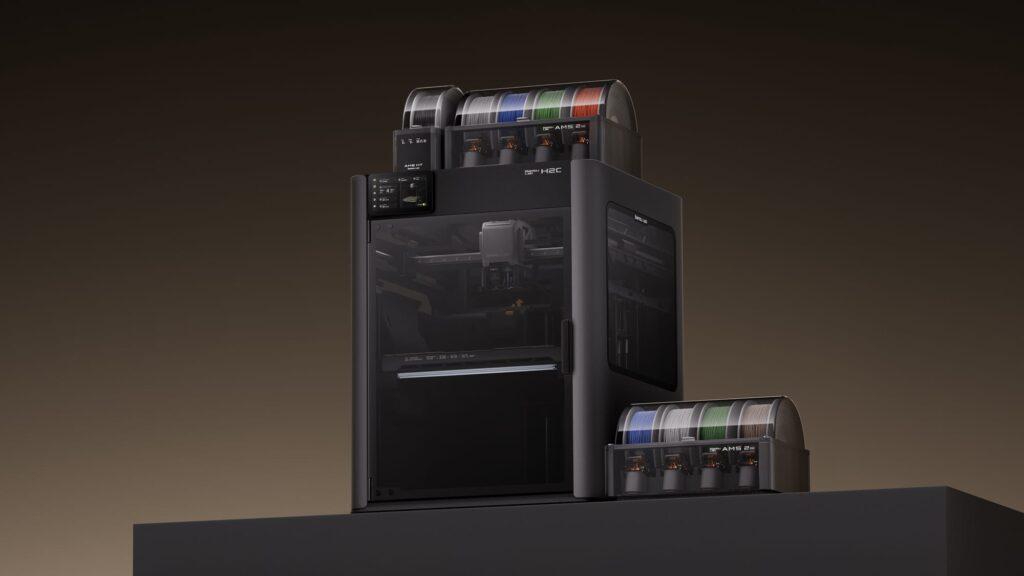
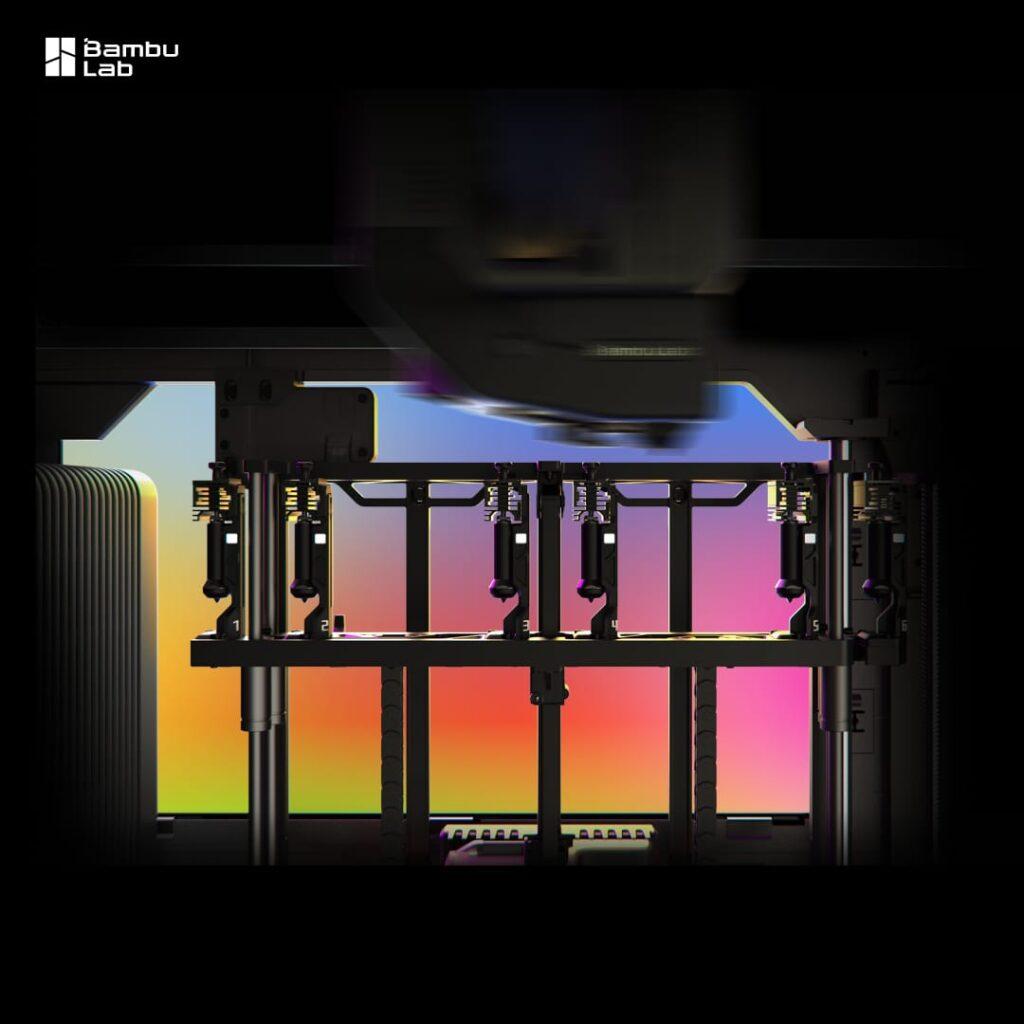
The Bambu H2C Vortek is Bambu Lab’s flagship multi-material desktop printer, built around a completely new approach to filament switching. Instead of pushing and pulling filament through a single nozzle (and generating a pile of purge waste in the process), the Bambu Lab H2C physically swaps hotends. Up to six interchangeable hotends sit in a rack on the right-hand side of the printhead. When the printer needs a different material, it picks up the corresponding hotend, heats it in around 8 seconds using inductive heating, and carries on printing. No purge tower. No contamination.
The system is called Vortek – and it’s the reason the H2C looks very similar to the H2D on the outside but behaves quite differently on the inside. This article covers what the H2C Vortek actually does, how the specs compare, which configurations are available, and whether it makes sense for your workflow.
What is the Vortek Hotend Change System?
Most multi-material 3D printers use one of two approaches: filament swapping (one nozzle, different filaments fed in sequence) or a tool changer (multiple complete toolheads). Both have trade-offs. Filament swapping produces significant purge waste every time the material changes. Tool changers require substantial extra space because the whole toolhead is being swapped.
The Vortek Hotend Change System takes a different route. Only the hotend itself changes, not the entire toolhead. The six swappable hotends attach magnetically and communicate with the printhead contactlessly using high-frequency wireless communication. There are no mechanical connectors to wear or corrode.
When switching between the six active hotends, there is no purging at all. Each hotend retains its own material, so switching from one to another introduces no contamination. Bambu Lab reports up to 58% less purge waste compared with traditional single-nozzle AMS systems – on complex multi-colour prints, that difference in waste can be substantial over time.
There is also a seventh position on the left-hand side, which is a fixed standard hotend. It is not part of the Vortek swap rack but works alongside it, giving you a total of seven simultaneous materials without any purging. Beyond seven, the printer can work with up to 24 filaments by connecting additional AMS units, though purge logic does kick back in for materials beyond the seventh.
The Hotend Remembers
Each Vortek hotend has onboard memory that records which filament it was last loaded with. When you start a new job, the printer suggests using the same assignment, cutting down setup time and eliminating filament mix-up errors.
Bambu H2C Specs at a Glance
The H2C shares the same Core-XY architecture and chassis as the H2D and H2S, but the Vortek rack occupies some space on the right-hand side of the build plate, so the available print area is slightly smaller.
Build volume (multi-nozzle mode) | 300 × 320 × 325 mm |
Build volume (max width mode) | ~330 × 320 × 325 mm |
Technology | FFF (Fused Filament Fabrication) |
Hotend configuration | 6 × swappable induction hotends (right) + 1 fixed hotend (left) |
Max filaments (purge-free) | 7 |
Max filaments (with AMS, with purge) | 24 |
Max nozzle temperature | 350°C (all seven positions) |
Induction heat-up time | 8 seconds |
Chamber temperature | Actively heated up to 65°C |
Heatbed temperature | Up to 120°C |
Motion accuracy (with Vision Encoder) | Under 50 micrometres |
Extruder | PMSM servo, up to 10 kg extrusion force |
Nozzle sizes supported | 0.2 mm, 0.4 mm, 0.6 mm, 0.8 mm |
Sensors (Laser Edition, fully equipped) | 59 |
Noise level (Benchy print) | 50 dB avg, 61 dB peak |
Air filtration | G3 pre-filter, H12 HEPA, activated carbon |
Connectivity | Wi-Fi, cloud remote, offline mode, Developer Mode (MQTT) |
The Vision Encoder is an optional add-on that brings positioning accuracy to under 50 micrometres. The PMSM servo extruder samples resistance and position at 20 kHz, which gives the printer real-time detection of filament grinding, clogs and flow deviations.
H2C Vortek Configurations Available at Additive-X
The Bambu H2C Vortek is available in several configurations through Additive-X. The main distinction is whether you want laser capability included.
H2C Vortek AMS 2 Pro Combo
The standard entry point into the H2C. Includes the printer itself, one AMS 2 Pro for automated filament handling, and a full set of hotends (four 0.4 mm hardened steel induction hotends, one 0.2 mm, one 0.6 mm, and two standard 0.4 mm hotends for the left position). This configuration supports four induction hotends actively fed by the AMS 2 Pro, with the additional hotends available for dedicated material assignments.
Available at £1,999 inc. VAT (£1,665.83 ex. VAT). View the H2C Vortek AMS 2 Pro Combo at Additive-X.
H2C Vortek Laser Full Combo (10W)
Adds a 10W laser module for engraving and cutting work alongside the Vortek multi-material system. The laser and 3D printing functions are separate operating modes.
View the H2C Vortek Laser Full Combo 10W at Additive-X.
H2C Vortek Laser Full Combo (40W)
Steps up to a 40W laser for more demanding engraving and cutting applications. Worth noting: the H2S could not support a 40W laser module due to its spatial constraints, but the H2C can – including after a Vortek upgrade from H2S.
View the H2C Vortek Laser Full Combo 40W at Additive-X.
To browse the full Bambu Lab range at Additive-X, including accessories, filament and spare hotends for the H2C, visit the Bambu Lab section of our shop.
Bambu H2C vs H2D: What’s the Difference?
The H2C and H2D look almost identical from the outside. Both share the same chassis, the same glass and metal construction, the same 5-inch touchscreen, and the same fully enclosed heated chamber. The difference is the toolhead.
The H2D has a standard dual-nozzle setup, which is well-suited to jobs where you want true independence between two materials – printing soluble support interfaces alongside structural materials, for instance, or running hard and soft materials in combination.
The H2C Vortek trades that dual-independence for the six-hotend swap rack. You gain the ability to print with up to seven materials without purging, and that difference matters for anyone regularly running complex multi-colour or multi-material jobs where waste filament adds up.
One practical note: the H2C’s build plate is slightly smaller than the H2D’s (the Vortek rack takes up space). The build plates are not interchangeable between the two machines, though the vision calibration plates, laser platform and cutting mats are compatible across the H2 series.
H2D or H2C? A quick steer:
- If your workflow is mostly dual-material (support interface + structural, hard + soft), the H2D is the cleaner choice.
- If you regularly print complex multi-colour or multi-material jobs and waste reduction matters, the H2C Vortek makes more sense.
If you’re not sure, our team can talk it through. Call 01765 694 007 or get in touch here.
What the H2C Does Automatically
Automation is central to what makes the H2C different from earlier multi-material systems. These are the processes that happen without user input:
- Pre-flight scan of the build plate before each print
- Touchless nozzle offset calibration (to within 25 micrometres)
- Verification of nozzle compatibility against slicer settings
- Real-time extrusion monitoring via macro lens camera
- Intelligent filament-to-hotend assignment to reduce waste
- Pressure Advance (PA) calibration per filament
- Adaptive airflow and chamber temperature control
The H2C comes with up to 59 sensors in its Laser Edition configuration (fully equipped), all feeding into a quad-camera vision system running a neural algorithm for real-time anomaly detection. For most users, this means the printer manages itself through a job without needing much monitoring.
Can You Upgrade an H2D or H2S to the H2C?
Yes, both the H2D and H2S can be upgraded to the H2C using a Vortek Upgrade Kit. That said, this is not a quick job. Bambu Lab estimate the process takes around 4 to 5 hours and describe it as requiring technical skill, patience and careful instruction-following. The kit ships in five separate packages.
For most users, buying an H2C directly is the easier route. Upgrading later also costs more overall than buying the H2C from the outset. If you already own an H2D and are weighing the upgrade against a direct purchase, the Additive-X team can give you an honest assessment of which makes more sense for your situation.
One important limitation: upgrading an H2D Pro to H2C is not recommended. The H2C does not support the professional connectivity features of the H2D Pro, including Ethernet connections and WPA2-Enterprise Wi-Fi.
Who Is the Bambu H2C Vortek For?
The H2C sits between a desktop FFF printer and a light industrial machine. It’s aimed at users who print complex multi-material or multi-colour parts regularly and want to spend less time managing filament waste and more time running jobs.
It fits well for:
- Product designers and engineers prototyping parts that combine rigid and flexible materials
- Small production environments running short-run multi-colour parts
- Makers and creators working on detailed multi-colour models without wanting to paint or assemble
- Education and R&D teams that need a capable, automated printer with broad material compatibility
At a maximum nozzle temperature of 350°C across all seven positions, the H2C can run the full Bambu Lab filament range including engineering materials such as PA6-GF, PC FR (fire-retardant polycarbonate) and high-temperature variants. The 65°C heated chamber helps with warping on demanding materials and improves layer adhesion throughout.
View the Bambu H2C Vortek at Additive-X
The H2C Vortek AMS 2 Pro Combo is in stock and available for next working day delivery (order before 4:30pm, Monday to Friday).
- H2C Vortek AMS 2 Pro Combo – £1,999 inc. VAT
- H2C Vortek Laser Full Combo 10W
- H2C Vortek Laser Full Combo 40W
Want to talk it through before you buy? Call 01765 694 007 or get in touch with the team.
Frequently Asked Questions
Does the Bambu H2C Vortek produce zero purge waste?
When printing with seven materials or fewer, and each of the six Vortek hotends is dedicated to a specific filament, there is no purging between material changes. If you expand beyond seven materials using additional AMS units, standard purge logic applies to those extra materials.
Is the H2C build plate the same as the H2D?
No. The Vortek rack occupies space on the right-hand side, so the H2C build plate is slightly smaller than the H2D’s. The two build plates are not interchangeable. Vision calibration plates, laser platforms and cutting mats are compatible across the H2 series.
Can the H2C print without an internet connection?
Yes. The H2C supports full offline functionality, including file transfers, firmware updates and printer operation. For advanced users, Developer Mode provides MQTT port access for third-party integrations.
What nozzle sizes does the H2C support?
The H2C supports 0.2 mm, 0.4 mm, 0.6 mm and 0.8 mm nozzles across both the left fixed position and the six Vortek induction hotends. Mixing different nozzle sizes in the same print job is not currently supported by firmware, though Bambu Lab has indicated this may be added in a future update.
Does Additive-X offer a demo?
Yes. You can book a printer demonstration at Additive-X’s showroom in Ripon, North Yorkshire, or request a printed sample part. Book a demo or request a sample.