




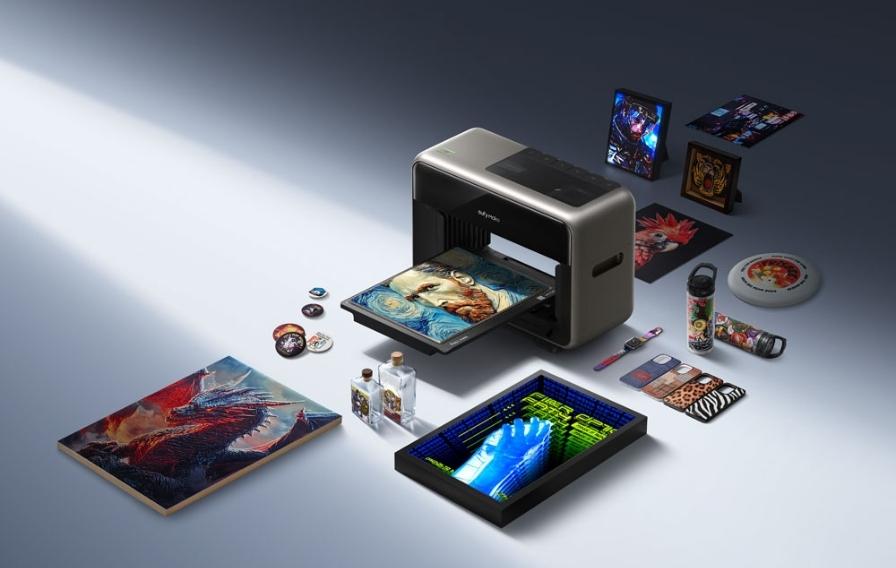
The EufyMake E1 is a different kind of machine to the FFF (Fused Filament Fabrication) and resin printers most people associate with 3D printing. It’s a UV printer that builds up genuine 3D texture, layer by layer, directly onto a flat or near-flat surface, combining full-colour printing with raised, tactile detail. If you’ve come across it and aren’t quite sure what it actually does compared to a standard 3D printer, this review covers exactly that.
The confusion is understandable. Most people hear “3D printer” and picture a machine building a complete object from nothing, the way an FFF or resin printer does. The EufyMake E1 isn’t doing that, and judging it against that expectation misses what it’s actually good at. It sits in a category of its own, somewhere between a high-end inkjet printer and a texture embossing machine, and once that distinction is clear, what it can do becomes a lot more interesting rather than confusing.
What the EufyMake E1 Actually Is
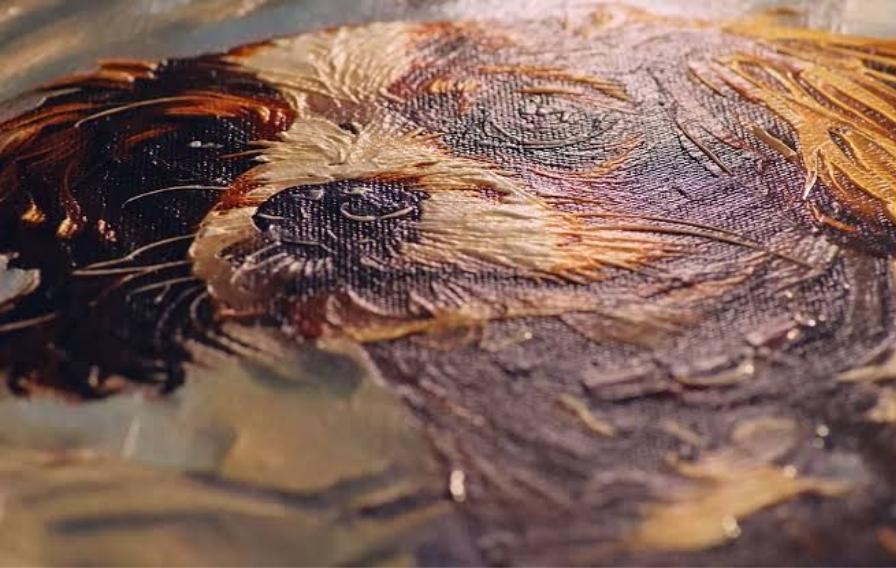
UV printing works by jetting tiny droplets of UV-curable ink onto a surface, then curing each layer with UV light before the next layer is applied. Unlike a standard inkjet printer, which lays down a single flat layer of ink, the EufyMake E1 builds up multiple layers in the same spot to create genuine raised texture, not just a printed image that looks textured.
This means a printed design can have real physical height and tactile detail, alongside full-colour printing, all from the same machine and the same print job.
What It Can Actually Print
Full-colour, textured artwork
The most obvious application is producing artwork, signage and decorative pieces with genuine raised texture matching the visual design. Brush strokes, embossed lettering and layered graphic elements can all have real physical height rather than being a flat colour print pretending to look textured.
Printing directly onto objects
The EufyMake E1 can print onto a range of existing objects and surfaces, not just blank canvas or card stock, adding decoration, branding or texture directly onto an item rather than printing a separate label or wrap to apply afterward.
Prototyping textured surfaces
For product designers exploring how a textured surface finish might look and feel before committing to a manufacturing process, the EufyMake E1 offers a fast way to test texture, pattern and colour combinations on a physical sample.
Personalised and small-batch products
Because each print job can be unique, the EufyMake E1 suits personalised gifts, short-run branded items and bespoke pieces where a traditional embossing or printing process would require expensive tooling for a small quantity.
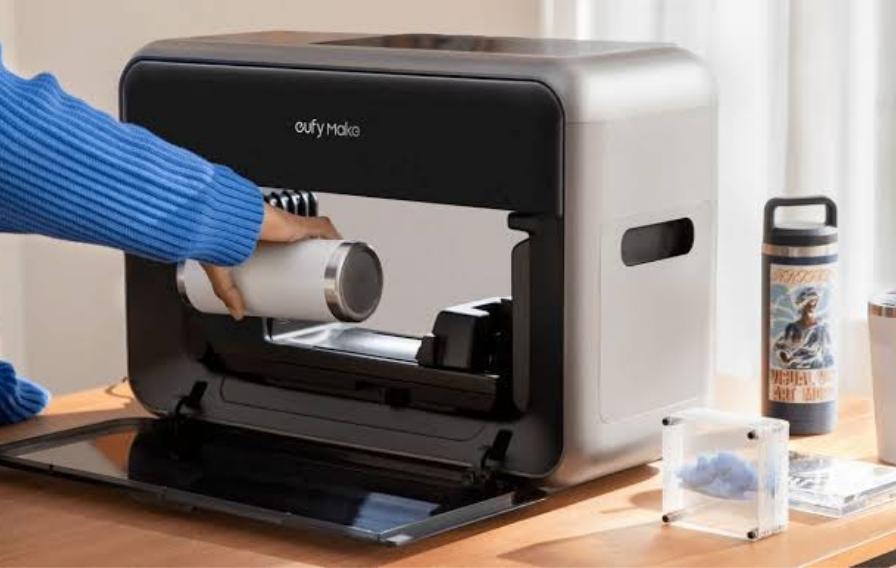
What It's Not
It’s worth being clear about what the EufyMake E1 isn’t, since the “3D” in its description sometimes leads to confusion with structural 3D printing.
This isn’t a replacement for an FFF or resin printer producing functional, load-bearing parts. The texture it builds is genuine raised detail, but it’s not designed to produce structural components, brackets, or anything that needs to bear meaningful mechanical load. Think of it as sitting in a different category entirely, closer to advanced printing and finishing than to functional part manufacturing.
How the Build Process Works in Practice
Layering for texture
Building real texture means printing multiple passes over the same area, with each layer cured before the next is applied. The height of the raised texture is controlled by how many passes are built up in that area, giving genuine control over how pronounced the tactile effect is across different parts of a design.
Colour and texture in one pass
Unlike processes that separate colour printing and texture embossing into two steps, the EufyMake E1 combines both, so the colour and the texture are aligned precisely without needing a separate registration step to line up a texture pass with a colour pass.
Curing as you go
UV curing after each layer means the ink is solid and stable before the next layer goes down, rather than relying on a single cure at the end. This keeps detail crisp even when texture height builds up significantly across a print.
Practical Considerations Before Buying
Surface and material compatibility
What you can print onto depends on the surface accepting UV-cured ink properly. Most flat or gently curved rigid surfaces work well, but it’s worth checking specific material compatibility for anything unusual before committing to a production run on an untested surface.
Print time for heavily textured designs
The more raised texture a design needs, the more passes the printer makes over that area, which extends print time accordingly. A design with extensive deep texture across a large area will take noticeably longer than a flatter, predominantly colour-based design.
Where this fits in your existing workflow
For most buyers, the EufyMake E1 sits alongside existing 3D printing equipment rather than replacing it, covering applications, decorative finishing, branding, personalised products, that a structural FFF or resin printer isn’t suited to in the first place.
Who Gets the Most Value From This Machine
Creative professionals and small studios
Artists, designers and small studios producing textured artwork, signage or decorative pieces get a genuinely new production option that wasn’t practical or affordable with traditional embossing and printing equipment.
Businesses producing branded or personalised items
Companies wanting to add branding, texture or personalisation directly onto products or promotional items, without commissioning custom tooling for each design, find the EufyMake E1 opens up short-run and one-off work that wouldn’t be economical through traditional methods.
Product designers testing texture and finish
Anyone developing a product where surface texture and finish matter, packaging, consumer goods, signage, benefits from being able to physically test texture options quickly rather than relying on renders or descriptions alone.
Frequently Asked Questions
Is the EufyMake E1 the same as a standard 3D printer?
No. It uses UV inkjet technology to build colour and raised texture onto a surface, rather than building a complete three-dimensional structural part from the ground up the way FFF, SLA or SLS printing does.
Can it print directly onto products I already have?
Yes, within the limits of surface compatibility and the printer’s working area. It’s worth testing compatibility with your specific material before running a full production batch.
How does texture height compare to traditional embossing?
The achievable texture height depends on how many layers are built up in a given area, giving genuine control over the tactile effect, though it’s worth checking the printer’s specifications against your specific design requirements if very pronounced texture is needed.
Final Thoughts
The EufyMake E1 carves out a genuinely useful niche between flat colour printing and full structural 3D printing, combining real raised texture with full-colour output in a single pass. It’s not a replacement for a functional parts printer, and it shouldn’t be judged against one. For creative work, branding, personalisation and texture prototyping, it does something neither category of printer does on its own.
If textured artwork, branded products or surface finish testing are part of your work, it’s worth seeing the EufyMake E1 print a real sample before deciding whether it earns a place alongside your existing equipment to see a sample print in person.